Your process. Your steps. Your durations. Planned to what the floor actually does.
MACH Schedule turns every order into its own multi-step process, each step on a different machine at its own duration, and places it across your floor on a visual timeline that updates in real time. Plan from a desk, run it from a tablet at the machine. Auto-scheduling respects capability, capacity, and changeover. When paired with MACH Monitor, the plan moves as the floor moves.
Last updated: July 22, 2026
The whole plan on one timeline. Drag a job and watch everything recalculate.
The visual schedule is an interactive timeline with day, week, and multi-week views. Drag orders onto machines and the plan reflects it immediately.
Here's what you're seeing. Orders dragged onto machines and placed on the timeline. Watch one get resequenced within a machine, then dragged to a different machine with a capacity warning prompt when the day is full. Each block shows its order, step, and specs. The in-progress order carries live status, with pace against the estimate updating as the floor runs. Parallel steps run on the same machine, so packaging follows right behind production without waiting for the full run to finish.
- Plan the day in detail, step back to the week to see capacity across machines, or pull out to 14 days to follow a multi-step order from first cut to last.
- Drag and drop to schedule, reassign, or re-sequence. Pending orders live in a drawer, ready to pull onto the timeline.
- Every block shows the order, the step, the product, and how close the due date is. Changeover time is visible and adjustable right on the timeline.
- Running blocks show live pace against the estimate. The day's schedule pace is continuously updated from the machine. You can read the state of the schedule without clicking into anything.
- Click any order and every one of its steps lights up across machines and dates, so you can trace a job end to end.
One click places the work. Capability, capacity, and changeover all respected.
Intelligent auto-scheduling places pending operations across machines in one click, then reports exactly what it could and could not fit.
Here's what you're seeing. The scheduler takes your pending operations and places them across machines, checking each one can actually run the job and fitting it into that machine's available hours. It sequences orders to optimize total changeover time using your setup rules, respects step dependencies and stay-on-machine operations, and allows pipelined overlap where a step can start before the previous one finishes. When it is done, you get a report: what is late, what spilled into overtime, and what could not be placed and why.
- One click places every pending operation, considering machine capacity windows, capability matching, step dependencies, and stay-on-machine rules.
- The setup matrix calculates changeover from the spec transition between consecutive orders, and the scheduler reorders work to minimize total changeover time.
- Rate rules adjust each operation's duration from the order specs, so a tougher material schedules at its real pace.
- A configurable overbook threshold allows small amounts of overtime instead of pushing a job to the next day, and overlap lets sequential steps start in parallel when the prior step doesn't need to fully complete first.
- The result report lists late orders, overtime blocks, capability overrides, and anything that could not be scheduled, with the reason. Clear pending, reflow to close gaps, or auto-reflow on an interval.
- Duration estimates start from the rules you set and improve with actual production history over time. Because MACH captures what every job actually takes on your floor, predictions sharpen as more jobs complete.
- Per-plant rules control the algorithm: shipping cutoffs, planning horizon, overbook tolerance, lock-in windows, and pace thresholds. Set them once and every auto-schedule run respects them.
Every way to run a line.
A line is a group of machines product flows through in order. How tightly they're coupled is a physical fact about your equipment, so it's a setting, not an assumption. The spectrum runs from machines that stand alone to a line that flows as one stream. Six modes cover it.
Each mode below follows two orders, A and B, through the same three-machine line, loosest coupling first. Faint blocks are changeover, the setup time before an order can run.
Independent
Every machine schedules on its own. Order B can start on Machine 1 while Order A still runs Machine 2. Throughput is tight because no machine waits on another. What you give up is coordination: the line isn't one unit, so nothing protects the flow between machines.
Use it when machines aren't physically connected. Standard job-shop behavior.
Pipelined
Order B follows Order A through the line, staggered one machine behind. As soon as A clears Machine 1 and it changes over, B starts on Machine 1 while A is still on Machine 2. There's no full lockout, so you keep most of independent scheduling's throughput while the line holds its order. An optional buffer sets a minimum gap between orders per machine when your process needs it.
Use it when the line runs continuously and orders should follow each other through without a full stop between them.
Partial Pipeline
The line stays reserved only up to a release point you choose, marked with a star. Order A holds Machine 1 and 2 until it clears that step, then the front frees and Order B starts while A finishes downstream. It splits the difference: the committed front is protected, the tail opens early for throughput.
Use it when the risk lives at the front of the line and the back end can safely take on the next order early. The release point is a setting on the step that frees it.
Full Reservation
The line is one atomic resource. Order A holds every machine until it clears the last, then changes over and Order B begins. The gap between orders is set by the slowest machine to change over, the bottleneck. It's the simplest honest model for a line where product is physically committed once it enters. The trade is throughput: Machine 3 sits idle while A is up front, and nothing else can use it.
Use it when product can't be interleaved once it enters. Changeover is the max of all machines when operators set up in parallel, or the sum when one operator works down the line.
Reserved + Setup Pre-Start
Full reservation with the dead time cut out. The line still runs one order at a time, but once a machine finishes its part of Order A it sits idle, so the scheduler starts Order B's setup there while A works downstream. When A clears the line, B's changeover is already done and it starts almost immediately. Same protection as full reservation, a shorter gap between orders.
Use it when a reserved line loses real time to changeover between orders and the upstream machines are sitting idle anyway.
Continuous Flow
Every machine works the same order at once. Product enters at Machine 1 and streams through all three as one connected flow, so its time on the line is roughly the longest single step, not the sum. Switching orders ripples through: Machine 1 changes over first while the tail of Order A still runs downstream. The gap is set by the bottleneck, the machine with the longest changeover, and setup can pre-start upstream to shrink it.
Use it when the equipment is physically one stream, conveyors and connected stages, with no meaningful notion of a part sitting between machines.
One model underneath all six: an order, its steps, and machines with working hours. What changes between modes is how much the line behaves as a single unit. That's yours to set per line, because it's a fact about your equipment, not ours to assume.
The schedule and the floor, the same picture at the same time.
Real-time MACH integration connects Scheduler to MACH Monitor so live machine state and production progress appear right on the schedule.
Here's what you're seeing. With Monitor connected, each machine on the schedule carries its live state: running, idle, down, or in changeover. Block progress fills as the floor reports completed units, and the pace delta updates so you can see which jobs are ahead and which are falling behind. Every planner sees the same live picture at the same time, from a desk or a phone, without touching the floor systems directly. Without Monitor, the operator kiosk still reports basic status as operators start, pause, and complete jobs.
- Machine state overlays the schedule in real time: running, idle, down, and changeover, per machine.
- Unit completions from the floor update order progress live, and blocks show their pace delta so you can see which jobs are ahead and which are falling behind.
- When a job runs long or a machine goes down, the impact on the rest of the day is visible immediately. Reassign work before it cascades.
- The schedule becomes a record of planned versus actual, not a plan that goes stale by noon.
- Every planner sees the same live picture at the same time, whether they are at a desk, on the floor, or on their phone.
- Works standalone with manual completion too. Start with scheduling and connect the floor when you are ready.
One screen at the machine. All the data you need, captured.
The operator kiosk runs on any tablet at the work center. With Schedule, operators run the day's queue, track production, and report progress. Add Monitor and the kiosk connects directly to the machine for live state, automatic counts, and downtime capture.
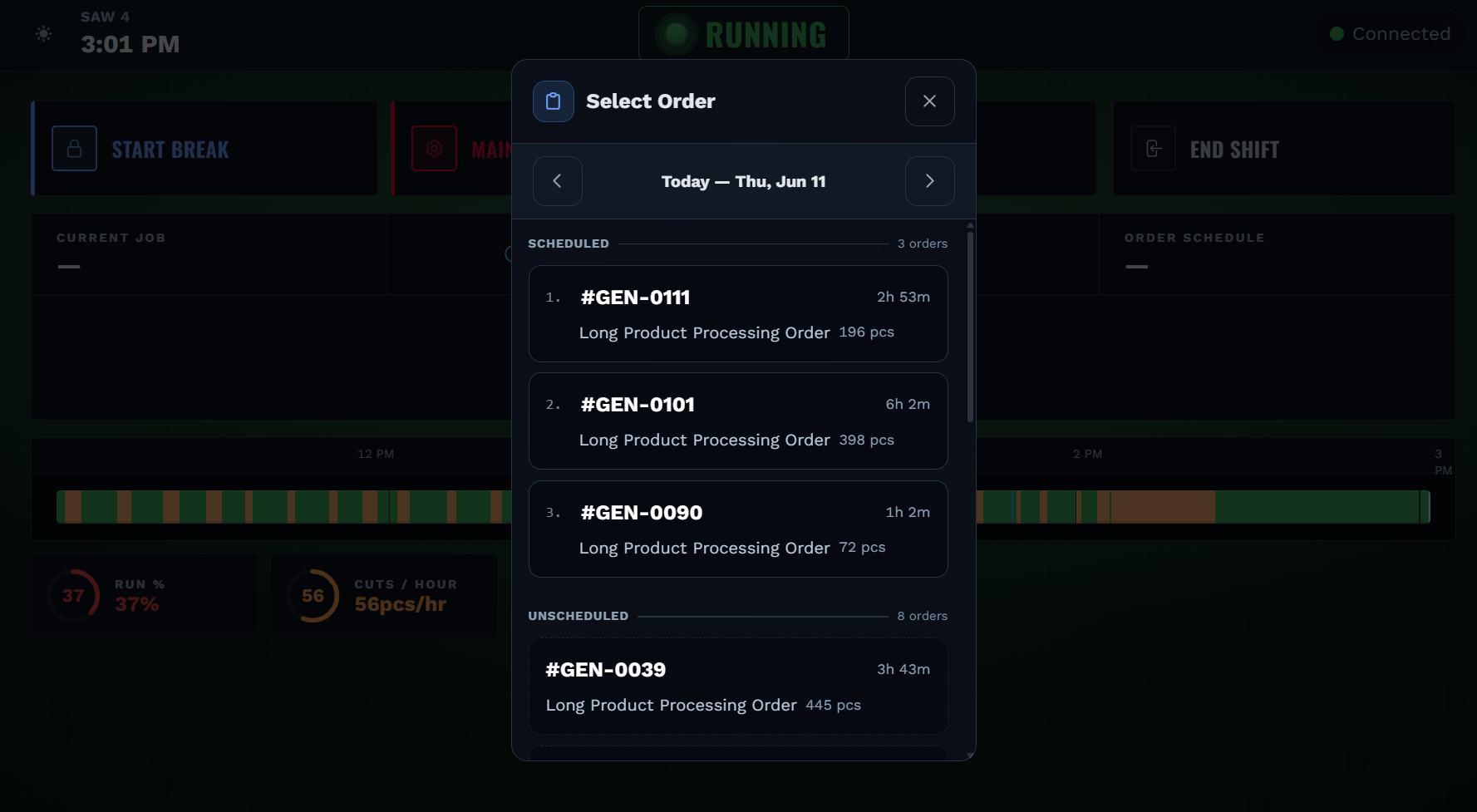
Here's what you're seeing. The day's work laid out in order, right at the machine. The operator taps Start and the timer runs, the progress bar fills against target, and a pace indicator shows whether they are ahead or behind. Pause asks for a reason, resume picks back up, complete closes the job. Add Monitor and the kiosk lights up with live machine state, automatic counts, and downtime capture.
- The day's scheduled work in order: each job with its order, product, target quantity, and estimated duration. Tap to start, track pace against the estimate, and complete when done.
- Pause with a reason, log a break, or hand off to the next shift. Every action is captured the moment it happens, not reconstructed from memory later.
- Live elapsed time, a progress bar, units remaining, and a projected end time keep the operator and the planner on the same page.
- Reject recording walks operators through quantity, category, and reason, logged against the active order and feeding quality analytics.
- Without Monitor, the kiosk captures manual counts and total time per job.
- Add Monitor and you get run versus idle time, automatic production counting, automatic downtime capture, changeover detection, a shift timeline showing the last 8 hours of activity, and floor displays that put the same data on a wall-mounted screen.
From a customer PO to scheduled operations. Defined once, reused on every order.
Orders and process routes cover the full lifecycle: reusable multi-step templates that turn specs into operations, a guided creation wizard, splitting and combining runs, parent-child tracking, ERP import, and attachments.
Here's what you're seeing. An order created in seconds. Select a route, and the form adapts to that process. Fill in the specs for the job, and the operations, machine assignments, and time estimates build themselves from the route. Save it and every step is ready to schedule. Or, import orders directly from your ERP.
- A route is a reusable recipe for how a product is made. Define the steps, the machine types, and the durations once, and every order built from that route gets its operations automatically.
- Order fields adapt to the route. A sawing order asks for cut length and bundle size. A CNC order asks for tolerances and finish specs. The form matches the process, not the other way around.
- Change the quantity or the material and the operations and durations recalculate as you type. A tougher material or a larger batch schedules at its real pace.
- Split a large order into batches to run on parallel machines, or combine several small orders into one production run. Parent-child relationships track them as a group.
- Each route step declares the capabilities the machine must have. Auto-scheduling checks them automatically, and manual assignment warns before you override.
- Import orders from your ERP through the integration API, or create them directly in MACH.
Questions about MACH Schedule.
How does MACH scheduling work?
MACH Schedule turns orders into operations using reusable process routes, then places them across machines on a visual timeline with day, week, and multi-week views. You can drag and drop manually or run one-click auto-scheduling, which respects machine capability, capacity windows, changeover, and step dependencies. When paired with MACH Monitor, the schedule reflects live floor state.
How do you schedule a job that runs across multiple machines?
MACH Schedule turns each order into a multi-step process route you define. Every step is placed where it runs, at its own duration — and a step can be a machine or a manual station, so routes reflect your actual process instead of a fixed template. One-click auto-scheduling sequences the steps across machines, respecting capability, capacity, and changeover. It's built for machine shop scheduling and any multi-machine, multi-step production.
How does MACH schedule a connected production line?
When machines are physically connected as a line, MACH can schedule the line itself as one resource instead of each machine on its own. How tightly the line is coupled is a setting you choose per line, because it's a physical fact about your equipment. That coupling runs across a spectrum, from fully independent machines to one continuous stream, so the plan matches how your line actually runs.
What line scheduling modes does MACH Schedule support?
MACH Schedule supports six line coupling modes: Independent (each machine schedules on its own), Pipelined (orders follow one machine behind), Partial Pipeline (the line frees at a release point you choose), Full Reservation (one order holds the whole line), Reserved + Setup Pre-Start (reserved, with the next order's setup overlapping to shrink the gap), and Continuous Flow (every machine runs the same order as one stream). You set the mode per line to match how the equipment is coupled.
Does MACH Schedule require a MES?
No. MACH Schedule works independently of a MES. It runs standalone, or connects to MACH Monitor for live floor state. Orders can be imported from an ERP through the integration API.
Can MACH sync with our ERP?
Yes. MACH Schedule syncs orders with your ERP through the integration API. Orders flow in from the ERP and, where your systems allow, updates flow back, so there is no double-entry. External orders are tracked with their source and scheduled alongside orders created in MACH.
What is the pricing for MACH?
MACH is priced per work center per month on annual billing, with volume tiers that lower your rate as you scale. Every product includes unlimited users, unlimited orders, and all features. No locked features. See the pricing page for full tier pricing.
All of this. $125 per work center per month.
Unlimited users. Unlimited orders. You pay per work center, and the rate drops as you scale.